
Watch Claude Code work in 3D
Open source, live 3D visuals for Claude Code, available for VS Code, as a desktop app and as a web client. Your repository becomes a map, and you watch Claude read, edit and think across it.
Install or update from a terminal
curl -fsSL https://orbit-code.imshaikot.com/install.sh | shInstall or update from a terminal
irm https://orbit-code.imshaikot.com/install.ps1 | iexRead the view at a glance
Everything on screen is your code. The colors tell you what Claude is doing with it.
- Files are spheres
- Colored by language and sized by the size of the file.
- Directories are bubbles
- Nested inside their parents. Scroll toward one to look inside.
- Imports are lines
- Drawn between whatever holds each end at the level you are looking at.
- Claude is the star
- It flies to each file Claude Code reads or edits, and the camera can follow it.
- Read. The file lights cyan as a comet leaves it.
- Edit. The file pulses amber.
- Think. Every import line on screen fires.
Watch a real session
Claude Code refactoring a file in Orbit Code, from the first read to the permission card. It runs 1:44.
One panel for the whole session
Real screenshots of Orbit Code working on its own repository.

Directories as bubbles
Scroll into a bubble to open it. Neighboring directories stay as faint rims, so you always know where you are.
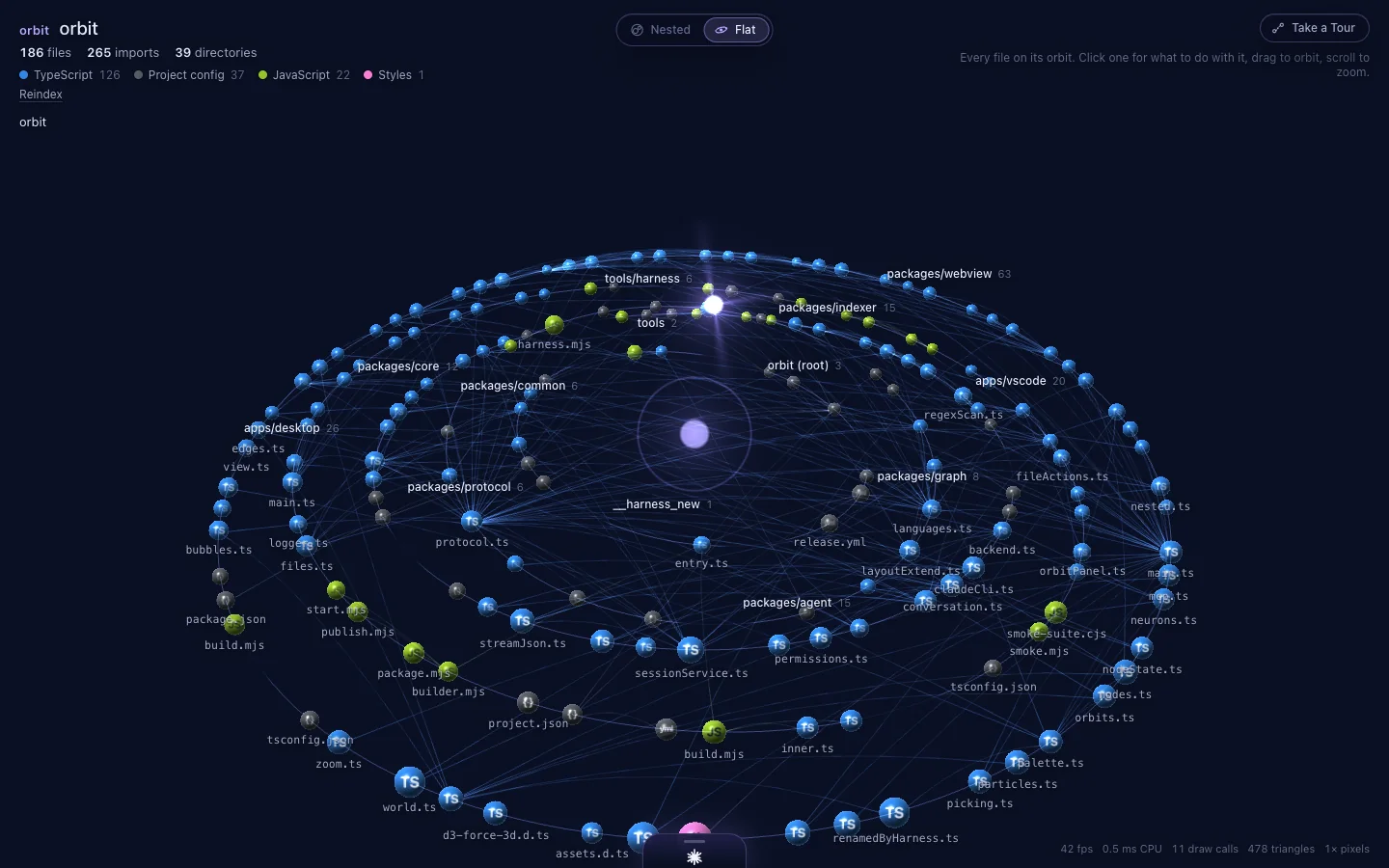
Every file on an orbit
Each project rides its own arc around the core, and imports arch between the files that use them.
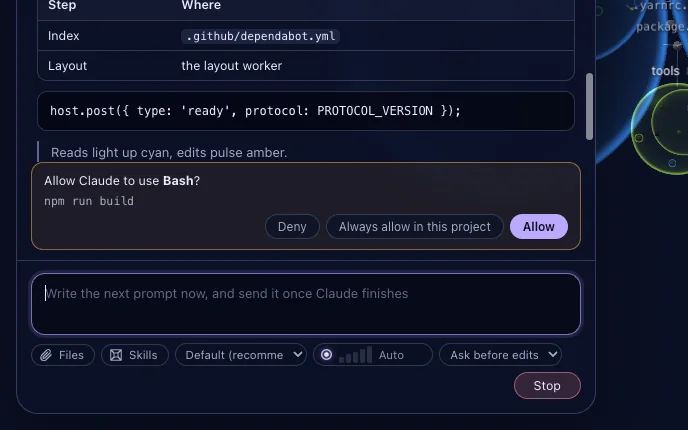
Approve from a card
Allow, deny or always allow a tool call without leaving the view. When Orbit is hidden, a notification asks instead.

Act on any file
Click a file to view its diff, edit it inline, rename it, delete it or attach it to your next prompt.

Every MCP server in view
See which servers are connected, failed or waiting for sign in, then reconnect, enable or sign in right there.
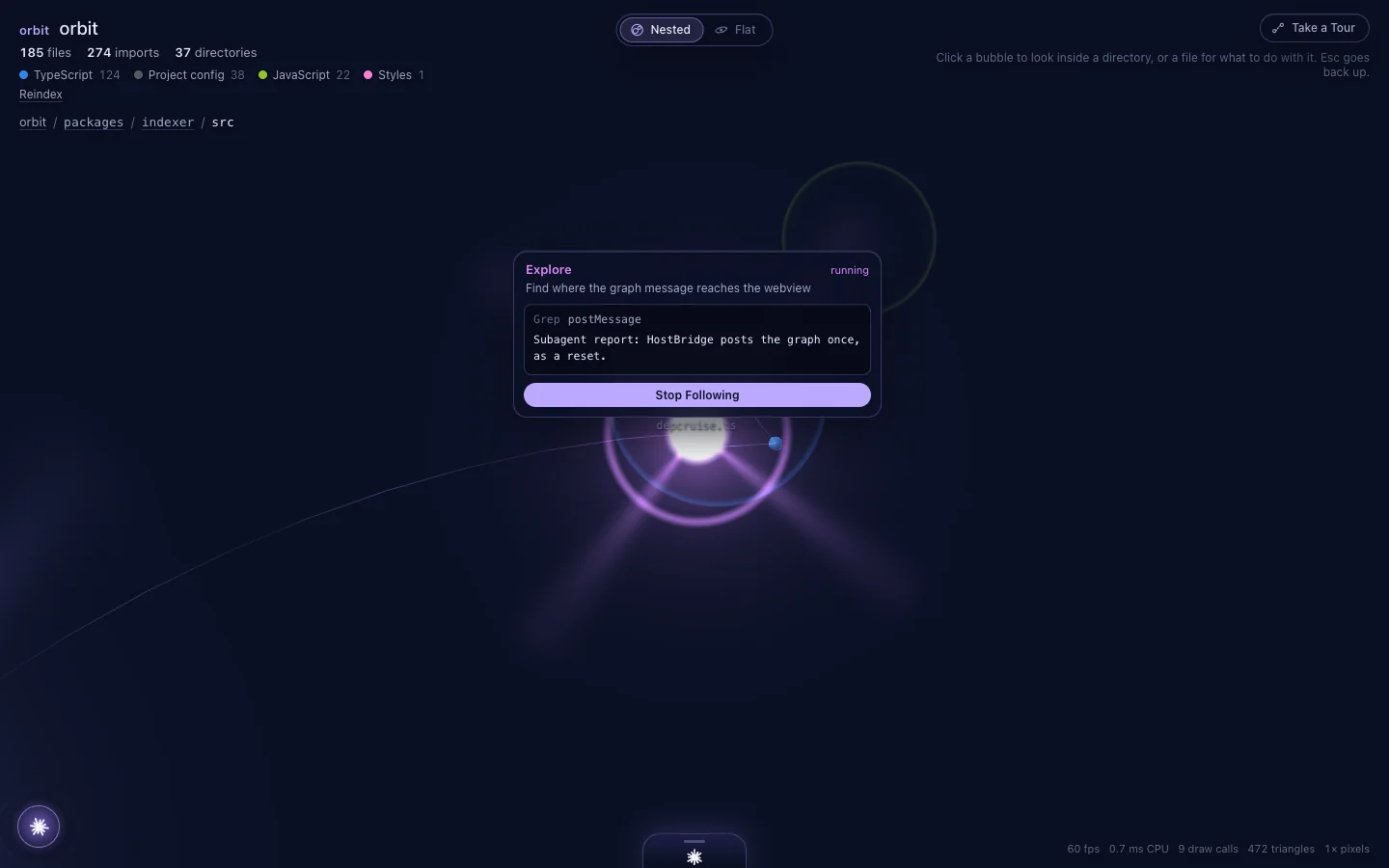
Subagents get their own star
When Claude hands off work, a smaller star reads files on its own. Click it to follow its output as it comes.
Built for how you work
Describe what you want or write every line yourself. Orbit shows the same session from your side.
See what Claude touches
No more guessing which files changed. Reads glow cyan and edits pulse amber, right where those files live.
Approve with a click
Permission requests arrive as cards with plain choices, so you never have to parse a terminal prompt.
Prompt from the panel
Pick a model and effort, attach files or skills, and run several conversations side by side.
Take a tour of your code
Let the camera fly through your project on its own and stop at the files that matter most.
A real dependency graph
JS and TS through dependency-cruiser, plus Python, Go, Rust, Java, C#, Swift, PHP, Dart and more, resolved through each project’s own manifests.
Live, incremental updates
Your edits, Claude’s writes and git checkouts show up within seconds without a full reindex, even in 20,000 file repositories.
Your CLI, your settings
Orbit runs your own claude CLI, so CLAUDE.md, hooks, skills, MCP servers and permission rules apply exactly as in a terminal.
Open and hackable
MIT licensed, no telemetry, and one TypeScript engine shared by the VS Code extension and the desktop app.
Install or update Orbit Code
Pick where you want it. Each option shows the newest version available and how to keep it current.
One command installs and updates
macOS and Linux
curl -fsSL https://orbit-code.imshaikot.com/install.sh | shWindows PowerShell
irm https://orbit-code.imshaikot.com/install.ps1 | iexFinds every VS Code based editor on your machine and installs the newest build. Run it again whenever you want to update.
Orbit Code for VS Code
Marketplace 0.2.3
Version 0.2.3 on the Visual Studio Marketplace, updated Sep 14, 2026. Needs VS Code 1.100.0 or newer.
Install Claude Code
Sign in once in a terminal. Orbit starts your own claude CLI, so skip this if you only want the graph.
Claude Code docsInstall the extension
Search for Orbit Code in the Extensions view, open the listing in VS Code, or run this in a terminal.
Open in VS Codecode --install-extension imshaikot.orbit-codeOpen Orbit
Reload the window, then run Orbit Code: Open from the Command Palette or click the Orbit icon in the activity bar.
Updating
VS Code keeps Marketplace extensions up to date on its own, so there is nothing to do.
Cursor, Windsurf and VSCodium
Release 0.2.4
These editors install from Open VSX, where Orbit Code is not listed yet. The install script puts version 0.2.4 into every one of them it finds.
Install Claude Code
Sign in once in a terminal. Orbit starts your own claude CLI, so skip this if you only want the graph.
Claude Code docsInstall the extension
To install into one editor only, add its name at the end: sh -s -- --editor cursor.
macOS and Linux
curl -fsSL https://orbit-code.imshaikot.com/install.sh | shOr download orbit-code-0.2.4.vsix and use Install from VSIXWindows PowerShell
irm https://orbit-code.imshaikot.com/install.ps1 | iexOpen Orbit
Reload the window, then run Orbit Code: Open from the Command Palette or click the Orbit icon in the activity bar.
Updating
Run the same command again to install the newest version over the old one.
Orbit Code desktop app
Release 0.2.4
Version 0.2.4, released Sep 14, 2026, for macOS. A window of its own for any folder, with no editor needed.
Install Claude Code
Sign in once in a terminal. Orbit starts your own claude CLI, so skip this if you only want the graph.
Claude Code docsDownload and install
The builds are not signed yet. On macOS, if it will not open, choose Open Anyway in System Settings, Privacy and Security.
Open a folder
Choose File, then Open Folder, and trust the folder when asked so Claude can run in it.
Updating
Download the newer release and install it over the old one. Settings, trusted folders and recent folders are kept.
Orbit Code in your browser
npm 0.2.0
Server 0.2.0 on npm, published Sep 14, 2026. Run it in your project and the web client on this site connects to it on 127.0.0.1. Your code never passes through the site.
Start the server in your project
Needs Node.js 20 or later. It prints a link and opens it in your browser.
npx @imshaikot/orbit-code-serverInstall Claude Code
Sign in once in a terminal. Orbit starts your own claude CLI, so skip this if you only want the graph.
Claude Code docsConnect the web client
The link from the terminal connects the page. It also guides you if you open it first.
Open the web client
Updating
npx runs the newest server each time, and this site always hosts the web client of the newest release. Add @latest to skip a cached copy.
npx @imshaikot/orbit-code-server@latestBuild the extension yourself
Always available
Build the newest code on the main branch into a .vsix and install it in VS Code. Needs git, Node 22 or newer and Yarn 4 through Corepack.
Clone and install
git clone https://github.com/imshaikot/orbit-code.gitcd orbit-code && corepack enable && yarn installPackage and install
Builds a production .vsix and installs it with the code command.
yarn install-localOpen Orbit
Reload the window, then run Orbit Code: Open from the Command Palette or click the Orbit icon in the activity bar.
Updating
Pull, then package and install again.
git pull && yarn install && yarn install-localThe indexer on its own
From source
Index any repository into the dependency graph JSON that Orbit draws. It is not on npm yet, so run it from a clone.
Clone and build
git clone https://github.com/imshaikot/orbit-code.gitcd orbit-code && corepack enable && yarn installyarn buildIndex a folder
yarn index /path/to/project --out graph.json
Updating
Pull and build again.
git pull && yarn install && yarn buildOpen source, runs on your machine
Orbit Code is MIT licensed and built in the open. It has no telemetry and runs next to your own Claude Code.
MIT licensed
Read it, fork it, change it, ship it.
No telemetry
Orbit sends nothing anywhere. Claude Code talks to Anthropic exactly as it does in a terminal.
One engine, two hosts
The same core runs in VS Code and in the Electron desktop app.
Questions, answered
Is Orbit Code free?
Yes. Orbit Code is open source under the MIT license, and it runs on your own machine.
Do I need Claude Code?
For the live session, yes. Orbit starts your own claude CLI with your login and settings. Without it you still get the 3D dependency graph.
Does it replace the terminal?
It is a visual way to use it. The same CLI runs underneath, and Orbit shows every read, edit and thought on a live map of your code, with permissions answered in the panel.
Which languages does it understand?
JavaScript and TypeScript, Python, Go, Rust, Java, C#, Swift, PHP, Dart and more, with imports resolved through tsconfig, go.mod, Cargo.toml, pyproject.toml and other manifests.
Which editors does it work with?
VS Code 1.100 or newer, and editors built on it such as Cursor, Windsurf and VSCodium. The desktop app runs on macOS, Windows and Linux without an editor.
Does Orbit send my code anywhere?
Orbit itself has no telemetry and indexes your code locally. Claude Code sends what it needs to Anthropic, exactly as it does in a terminal.
Is Orbit Code made by Anthropic?
No. Orbit Code is an independent open source project. Claude and Claude Code are trademarks of Anthropic.